INDUSTRY:
UI/UX DESIGN
CLIENT:
UC DAVIS DES 112
YEAR:
2024
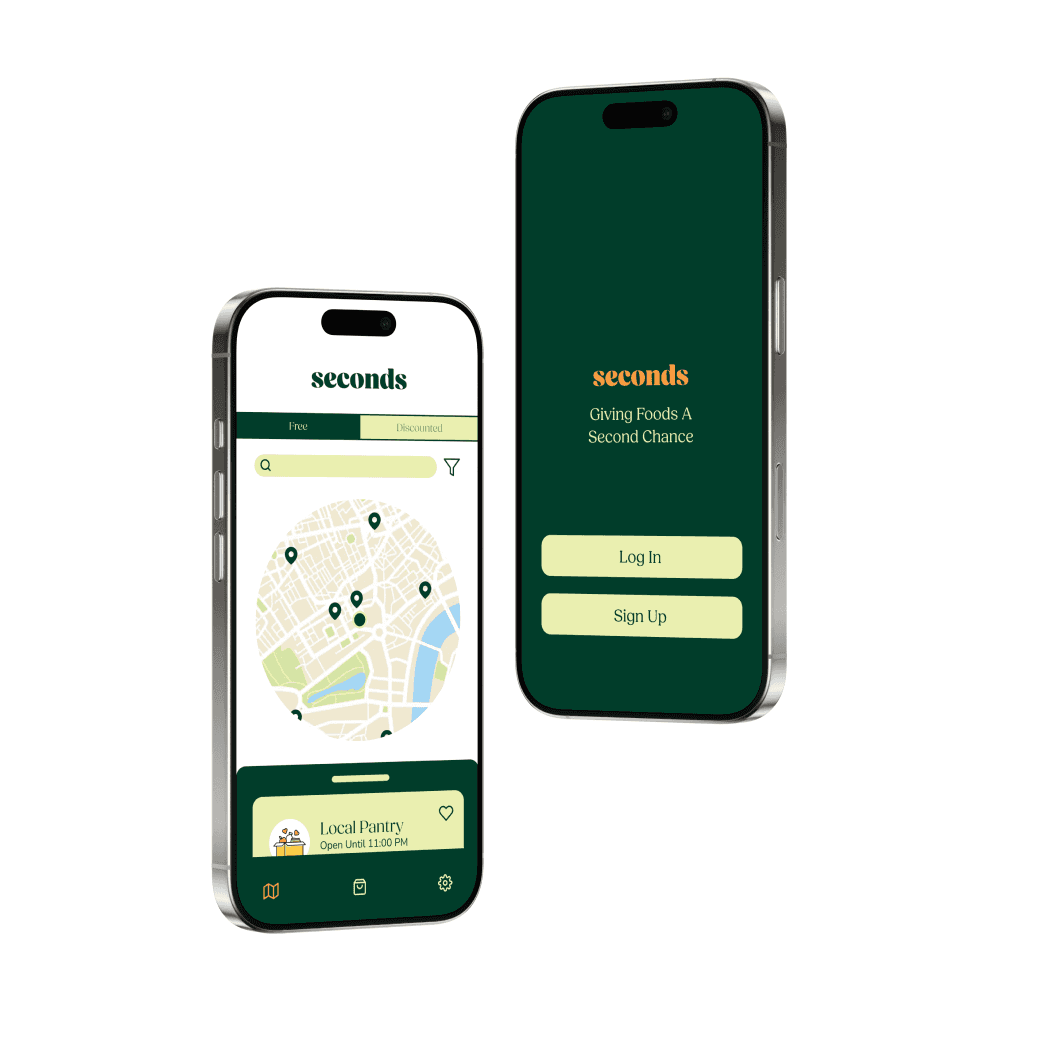
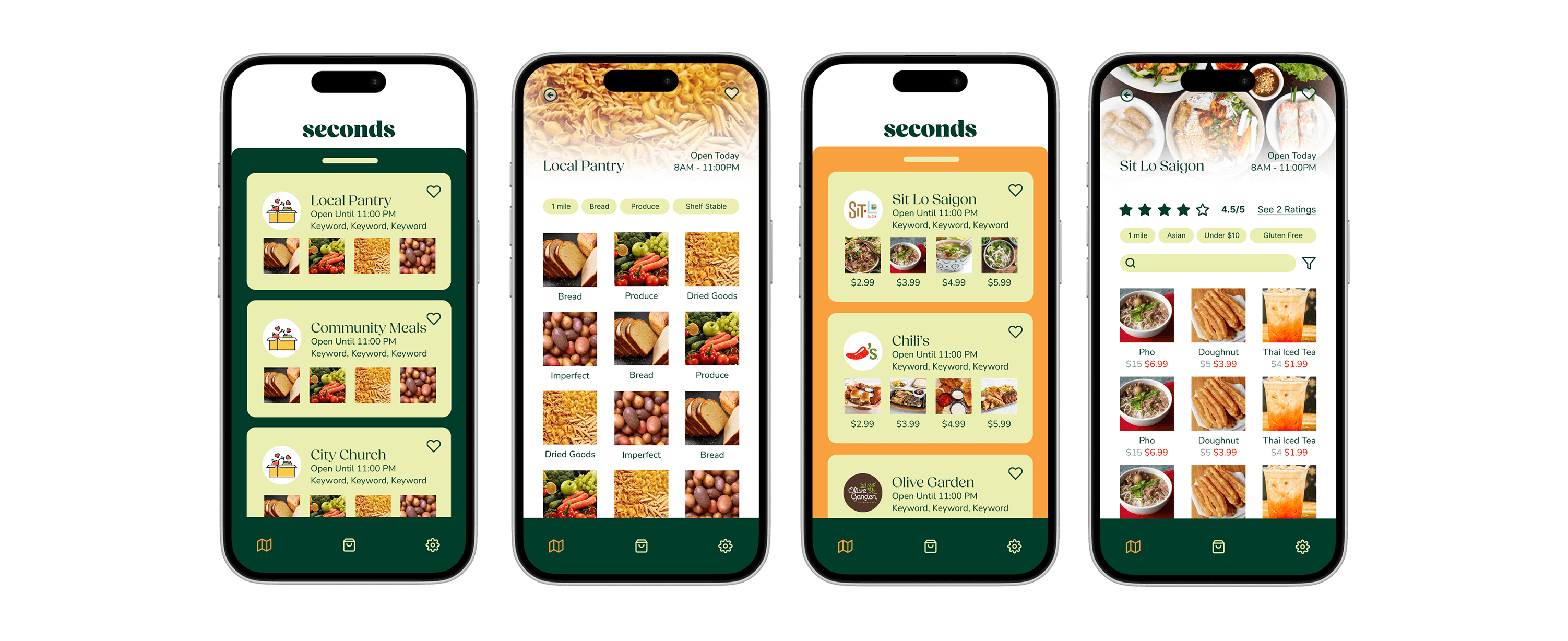
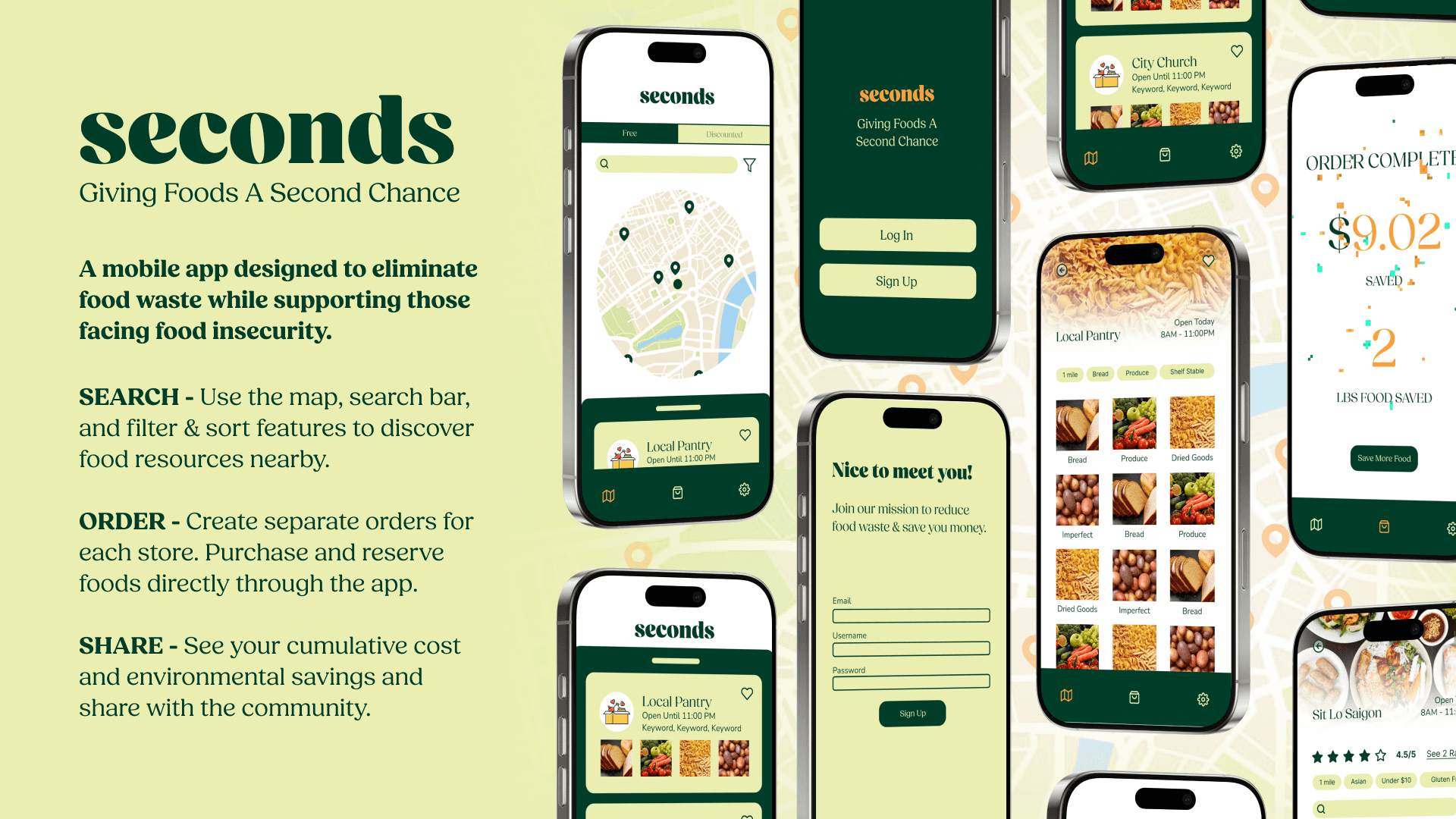
Seconds
Helping users find local meals to fight food waste and food insecurity
about.
Food waste and food insecurity are interconnected issues that have a negative environmental impact and disproportionately affect low income communities.
Current solutions often lack options that allow full community participation, catering towards middle and high incomes.
Over the course of five weeks, I explored some possible solutions to addressing both food waste and food insecurity through a mobile app, asking how we might:
reduce food waste and redirect surplus to those who need and want it
provide options for those who are from lower income communities
take the effort out of finding food resources nearby
research.
To better understand the needs of the app's target audience, I conducted research by interviewing fellow college students and performing a competitive analysis between two other popular food-saving apps.
SURVEYS
I met with 8 college students of various financial backgrounds, assessing the frequency and methods of their food purchasing habits. I found that:
On average, students get free or discounted food about twice per month.
Students typically purchase food from an app 1.5 times per month.
EBT card users were interested in using their card for free or discounted foods
USER INTERVIEWS
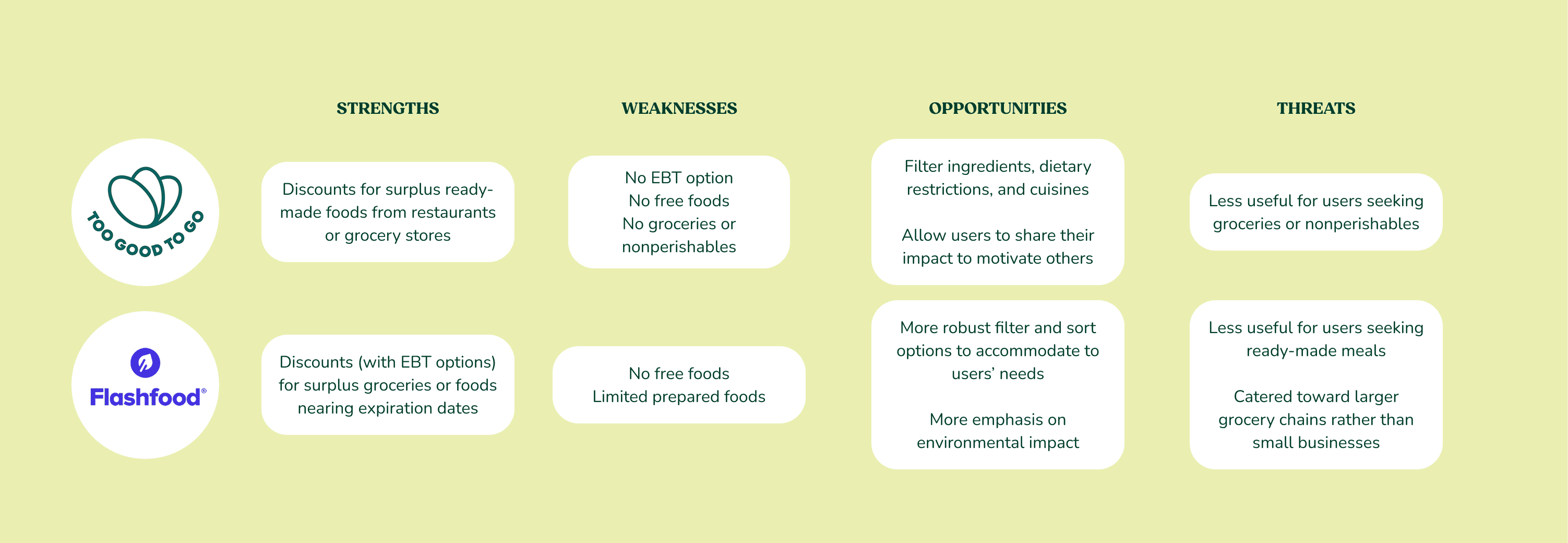
I also researched two popular mobile apps, Too Good To Go and Flashfood, that tackle food waste in different ways. Too Good To Go focuses more on providing discounts for surplus ready-made foods from restaurants and grocery stores, while Flashfood highlights EBT-compatible discounted groceries or foods nearing their expiration dates.
A SWOT analysis revealed the strengths of the two apps that my project could benefit from implementing, as well as some weaknesses to address in my design. My goal after completing this research step was to find a way to bridge the successes of both designs while mitigating their weaknesses.
KEY DEMOGRAPHICS
From my research, I was able to narrow down my target audience:
Community members ages 20-35
Seeking free or discounted food
Uses an EBT card or credit card
Wants prepared meals, groceries, and pantry staples
One major finding was that apps that address food waste typically did not appeal to both free and discounted food seekers. For my app, I wanted to bridge that gap so that anyone in a community would be able to participate in fighting food waste and food insecurity.
ideation.
The research phase helped me identify areas of the app to implement and ideate on. I began the ideation phase by creating a content inventory, then moving on to mapping the features out using a site map and laying out the user flows.
FEATURE BRAINSTORM + MATRIX
I created five categories and sorted the features between them. While many of the features were ones I had already envisioned for the app, several were added after completing the competitive analysis and seeing which of their opportunities I could take on.
Because my app would provide both free and discounted resources, I decided they would share similar features and be distinguished visually rather than hierarchically.
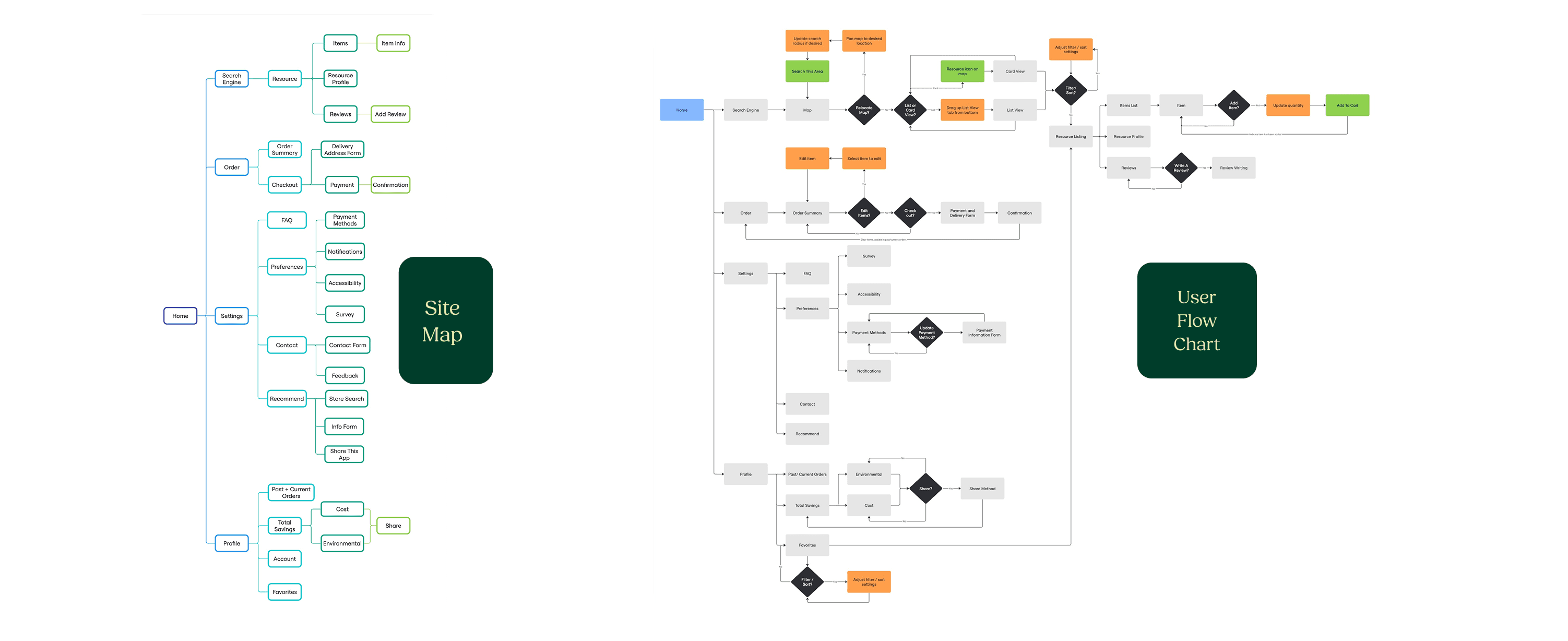
SITE MAP + USER FLOW
The final steps before moving on to mid-fi prototyping included a site map and a full user flow chart. These activities were helpful in envisioning the layout of the app and considering potential pain points for a user navigating through it.
mid-fi prototyping.
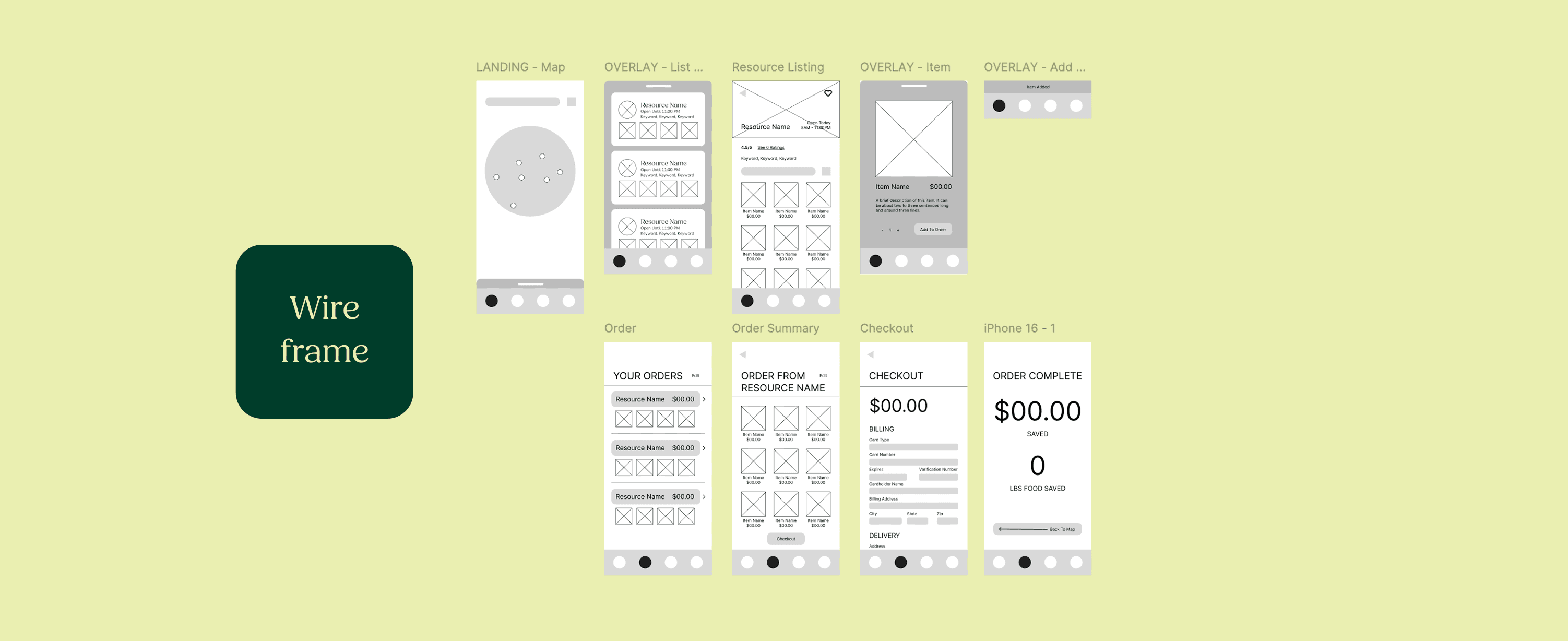
Based on the site map, I created wireframes and tested different variations on the features. Due to limited time constraints, I only created one version that would serve for both free and discounted food resources.
usability testing.
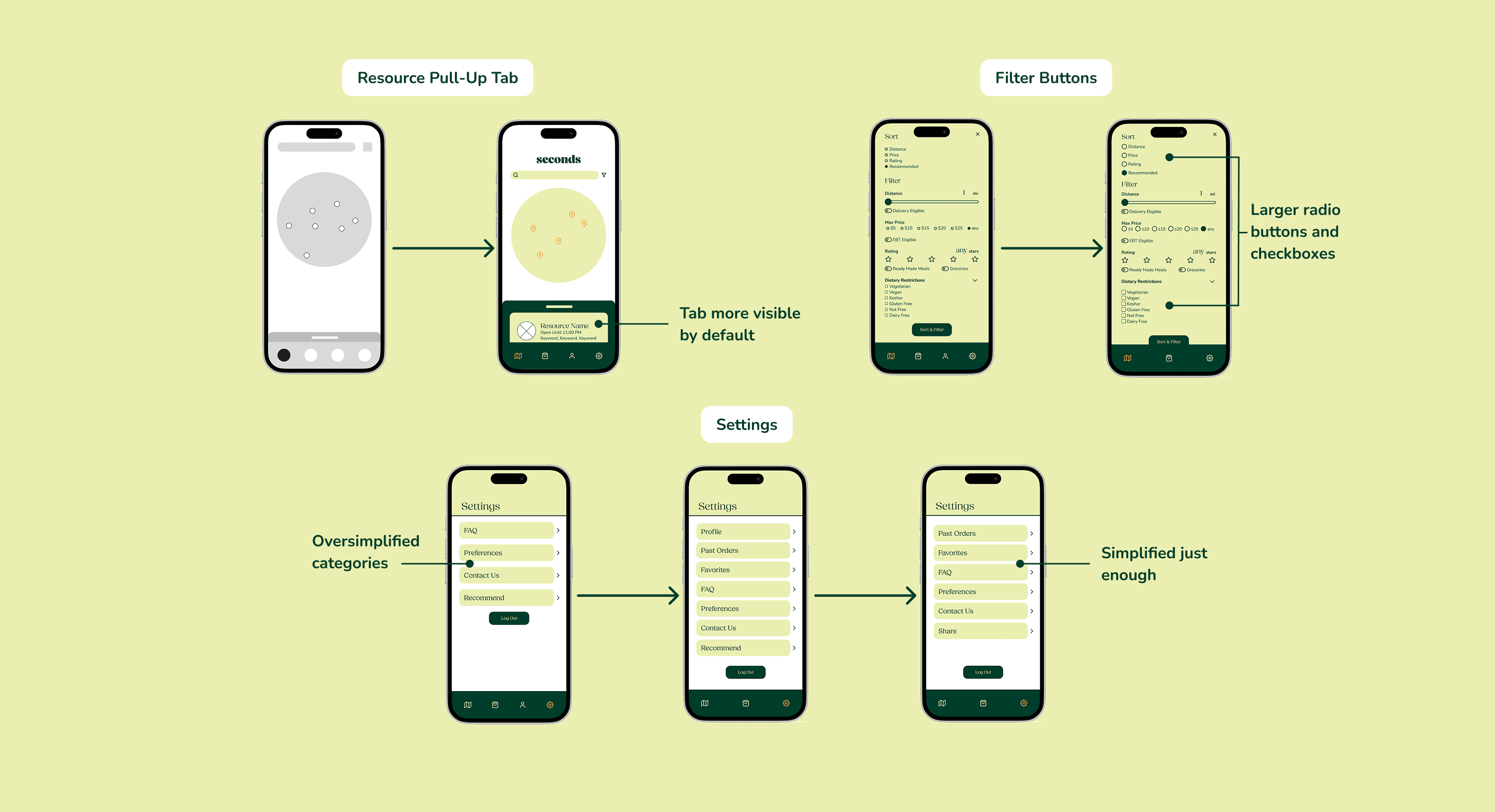
Each iteration of the app was followed by user testing. From lo-fi to hi-fi, I was able to implement the feedback I received into each of my drafts. Some key features underwent several iterations based on user insights before being finalized for hi-fi.
RESOURCE PULL-UP TAB
One of the first issues users encountered was not knowing where to find the search results. I was able to remedy this by having more of the tab shown by default.
FILTER BUTTONS
Several users had difficulties selecting options in the filter feature, so I increased the button size to make it easier to tap on the options.
SETTINGS
Users were confused on the navigation hierarchy of the original profile and settings pages. I first decided to relocate the profile page under settings, then condensed the subpages in the final draft to make it less overwhelming.
The final round of user testing before producing the final prototype revealed several critical a critical insight: greater visual differentiation between free and discounted resources was needed to help users identify products more efficiently.
This showed me that my visual distinctions between individual items was not enough. After conducting several rounds of iterations and user testing, I discovered that distinct tabs on the search page for the two categories of resources was most effective. To supplement the visual distinction, I made the free resources use a bright yellow-orange accent color instead of the initial green.
design system.
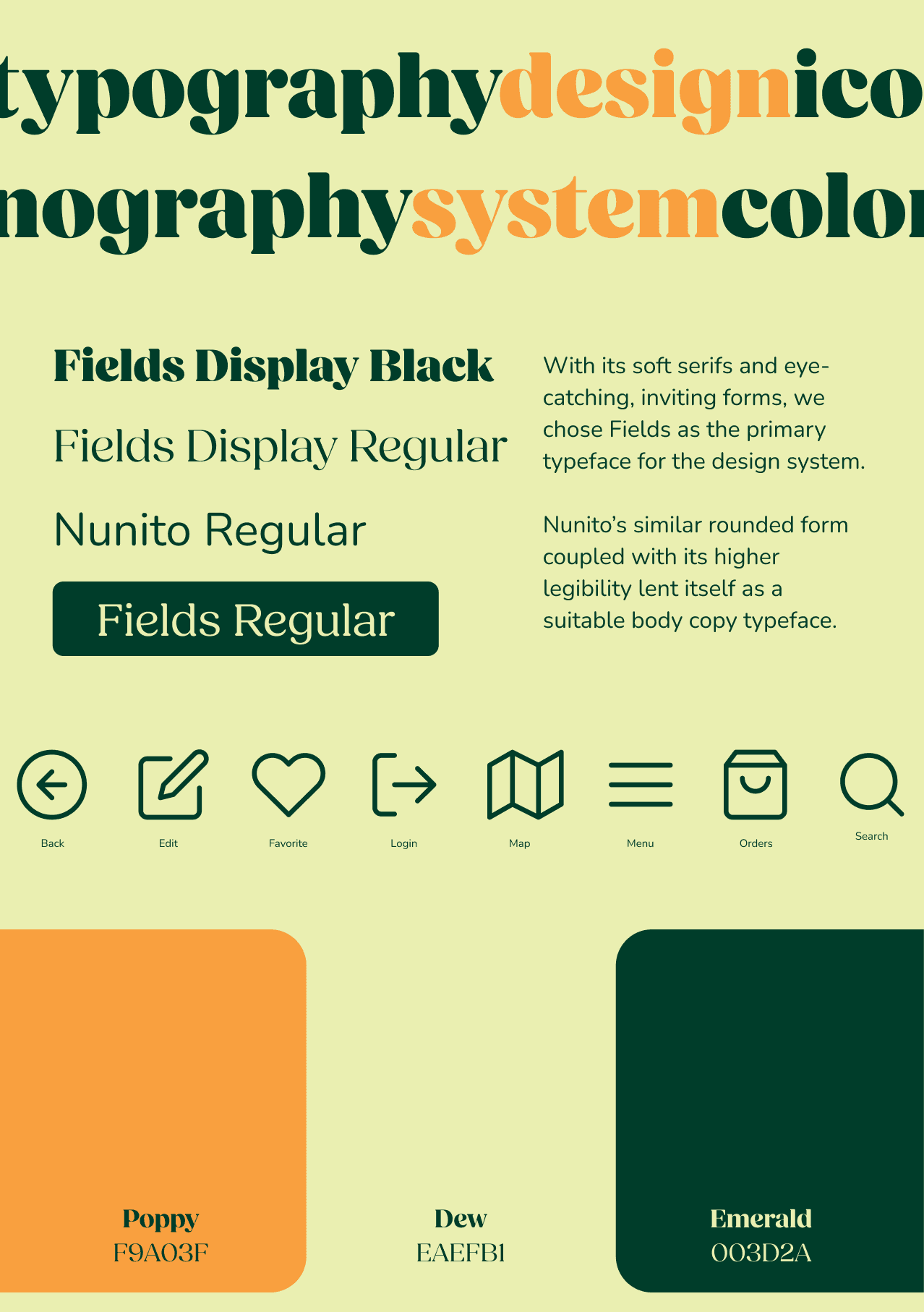
The key goal of the design system was to convey friendliness, excitement, and trust, inviting users of varying backgrounds to join the community of food waste fighters. Accessibility and and approachability were prioritized in all visual design decisions.
TYPOGRAPHY
With its soft serifs and eye-catching, inviting forms, I chose Fields as the primary typeface for the design system. Nunito's similar rounded form coupled with its higher legibility lent itself as a suitable body copy typeface.
COLORS
Poppy - a bright yellow-orange that represents the friendliness, energy, and innovation that Seconds brings to its users.
Dew - a pale yellow-green that communicates optimism and connects the yellow-orange with the deeper green hue.
Emerald - a deep green that represents the Seconds mission of working to save the planet while saving people money.
ICONOGRAPHY
The core icons are easy to identify and intuitive. Similar to the typography, the strokes are rounded to convey a warm and user-friendly impression. The icons are used for many of the main actions needed in the app, including key steps in creating and completing orders.
challenges.
NEW TO FIGMA
This project was my second time using Figma, and my first introduction to interaction prototyping. With its many features, the app was a great opportunity for me to practice using the Figma software and familiarize myself with better systems for keeping my files organized.
TIME CONSTRAINTS
The limited time made it difficult to conduct deeper research beyond the initial interviews and competitive analysis. It also forced usability testing to be extremely brief and focused on specific features rather than the app as a whole. While it was a struggle to stay on top of deadlines, it helped me learn how to prioritize key features and address the issues that were most essential to the user experience.
next steps.
The final prototype for Seconds was a culmination of many rounds of iterating and user testing. Given more time, the next steps I would recommend for the app would be:
Adding more robust filter and sort categories, including cuisine and a user input ingredient filter.
Implementing an in-app walkthrough rather than a swipe-through onboarding tutorial.
Providing a delivery service and discounts for using personal or environmentally friendly packaging.
Ensuring accessibility guidelines are met according to the WCAG and ADA standards, as well as cleaning up visual and spacing issues.
reflection.
The research process provided significant insights that greatly impacted the direction of the project. Having a greater understanding of the target audience and their needs allowed Seconds to have a more holistic approach to tackling environmental and equity issues.
Additionally, the process of user testing was critical in pinpointing the weaknesses of each prototype, which helped each successive iteration make more efficient adjustments. It improved my ability to empathize with the users and allowed me to validate concepts I wanted to test.
Overall, I found this project to be extremely helpful in becoming more acquainted with the user research and interface design processes. It was a great starting point, and I look forward to implementing the knowledge I gained from it in my future work.